Smart Home AI

Your home’s private AI.

A custom wall panel for the whole family, and Nova Puck voice devices for the rooms where you talk. Both run on a Home Assistant server that stays in the house. The home is controlled locally. Speech is processed locally. You ask in ordinary language.

How to think about it

A quieter kind of smart home.

01

Your home’s private AI

The server lives in the house. Home Assistant runs there, and speech is turned into text — and back into a voice — on that machine. The panel and the pucks talk to the server. They do not keep your account keys. The assistant may use a hosted model when a question needs one.
02

A two-hour smart-home upgrade

About two hours on site. We learn the house, connect what you already have, and leave a working panel and pucks behind. You sign in to your own accounts yourself. We don’t take those passwords with us.

03

One panel for the whole family

The wall panel is shared. Anyone home can see the day, change the climate, or ask the assistant. Nova Pucks carry the same assistant into other rooms, hands-free. One household, one place to look.

04

Works with what you already own

The visit starts from the devices in the house. A control stays off the screen when that device isn’t there, so the same panel fits a different home without a row of empty buttons.

05

Security and peace of mind

Cameras and the garage are on the panel today. Locks, a doorbell view, security modes, alerts, and safety sensors can be added for your home. Starting the sprinklers already asks you to confirm. Unlocking, disarming, and opening the garage are treated the same way: nothing risky moves until you say so.

What we put in

Three pieces. One house.

Everything here is installed for your home. The panel is custom. The pucks are the voice devices. The server is a private Home Assistant machine that stays on site.

Wall

Smart-home AI panel

A touchscreen for the household. Climate, the calendar, cameras, lights, and Ask AI live on one screen, with shortcuts you can add or remove.

Voice

Nova Puck

A small voice device for the counter or a side table. You speak, the house transcribes the words locally, the assistant answers, and the reply is spoken from the house. It can play radio, too.

In the house

Home Assistant server

The private hub. It holds the connection to your devices and runs local speech processing. The panel and the pucks ask the server. They don’t log in on their own.

Already in the house

We start from your devices.

Bring the list you already live with. We connect what is there and leave the rest off the panel. Shades, a television, solar, and an EV charger join that same list, and only when your home has them.

  • Thermostat
  • Locks
  • Cameras
  • Doorbell
  • Garage
  • Sprinklers
  • Pool
  • Lights
  • Shades
  • AV
  • Solar
  • EV

Which of these show up as controls depends on the home. Climate, sprinklers, the pool, the garage, cameras, and lights are on the panel today. Locks, the doorbell, shades, energy, and an EV charger can be added and tailored when those devices are yours.

Working today

On the panel now.

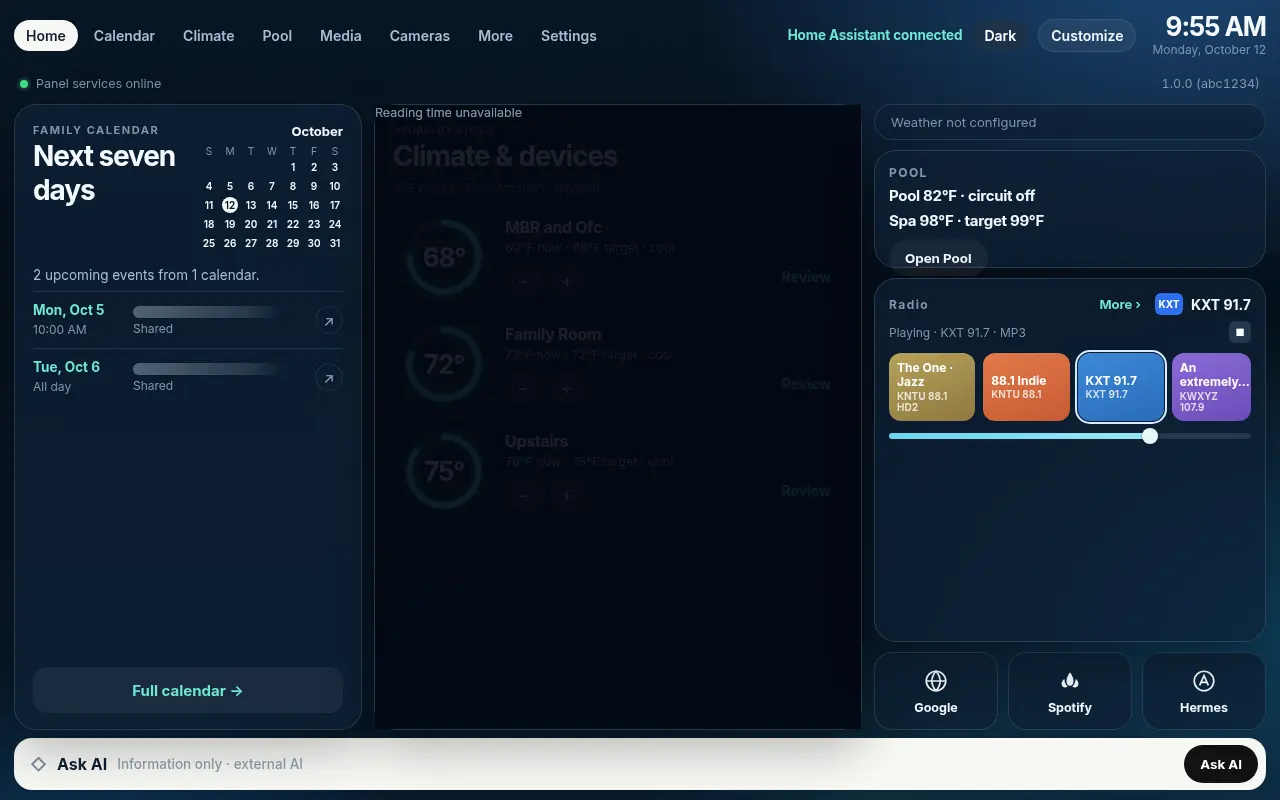
These are in use. A house we already run is written up in the Home AI case study, with the screens for climate, the calendar, radio, sprinklers, and the pool.

  • AI voice assistant

    Ask in text or by voice. On the wall panel, the microphone turns on when you tap it.

  • Climate

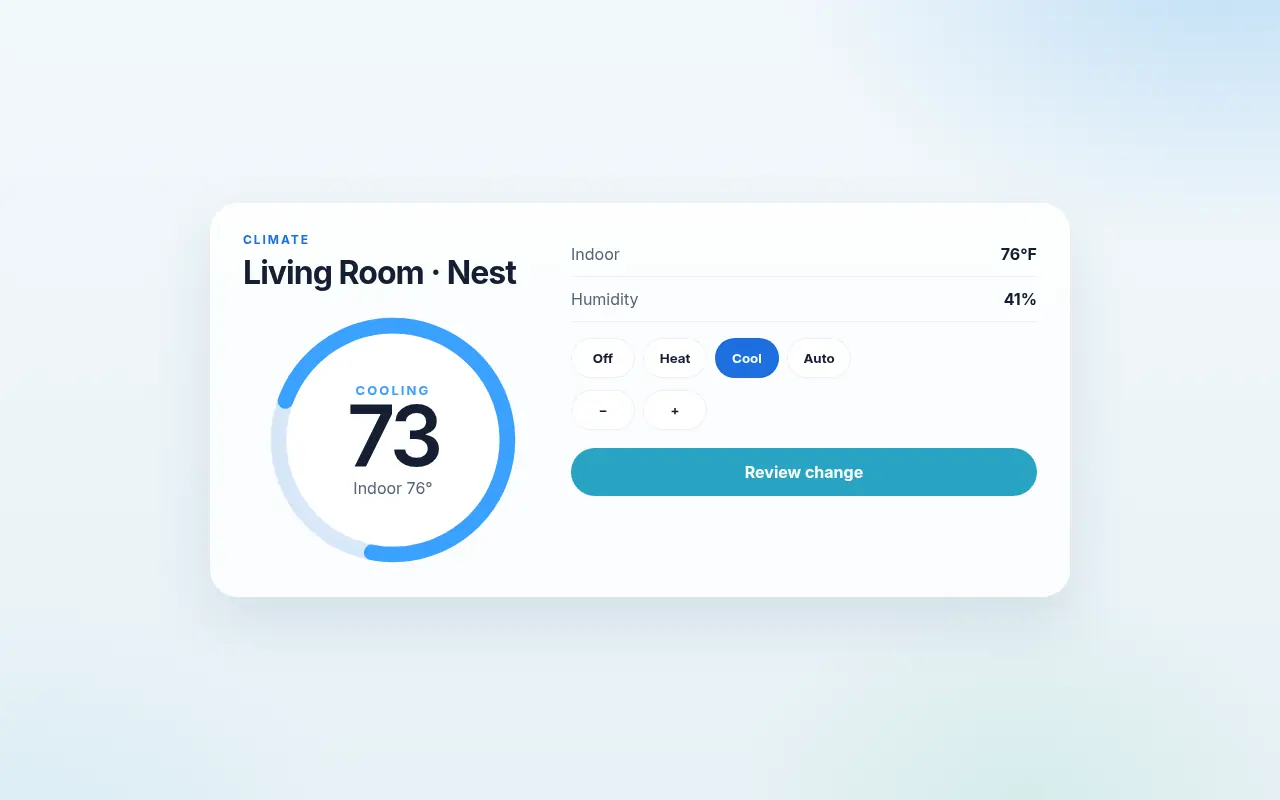
    A thermostat gauge. Set the mode, then review the change before it goes to the house.

  • Calendar

    A large card for the household calendar, there on the home screen.

  • Radio and music

    Station presets you can add or remove, and a volume control.

  • Sprinklers

    Zone history, programs on or off, and a confirmation before watering starts.

  • Pool

    A status tile for the pool, so you can see it without opening another app.

  • Garage

    Status and control from the wall, with a confirmation before it opens.

  • Cameras

    A camera view on the same panel as the rest of the house.

  • Lighting

    Light controls, without a second remote.

  • App shortcuts

    Small tiles for the apps you actually use. Add or remove them in Settings.

Not a boxed product

Can be added to your home.

None of the items below ship as a finished switch you flip on. Each one can be added and tailored to your home when the devices, accounts, or feeds are actually there. If a source isn’t set up, that piece stays hidden.

Around the house

The controls people expect on a wall panel, added for the equipment you have.

  • Weather

    A forecast for the glance you already make toward the window.

  • Security

    Arm and disarm from the panel, on the way out the door.

  • Locks

    A nighttime check: is everything locked?

  • Doorbell

    The front-door camera when someone is there, with two-way talk.

  • Scenes

    One tap for a mode such as Away, Movie, or Goodnight — lights, shades, and climate together.

  • Alerts

    Open doors, leaks, low batteries, and the alarm, in one place.

  • Energy

    Usage, solar, and battery, when the house has them to show.

  • Presence

    Who’s home, at a glance.

  • Safety sensors

    Leak, smoke, and CO, brought forward when they need you.

For the family

Shared-room extras. A portfolio view and stock news can sit behind a tap or a PIN, since the panel is in a common space. The portfolio view is read-only — the panel does not place trades.

  • Portfolio view

    A read-only look at value, the day’s change, and what you hold.

  • Stock news

    Headlines for the stocks in that portfolio.

  • Chores

    A list per person, checked off on the panel. The assistant can add a chore by voice.

  • Family photo frame

    Photos when the panel is idle, and a gallery to browse. A touch brings the home screen back.

  • News and trends

    Headlines and trending topics, fetched by the server so the panel doesn’t hold the keys.

Through the day

The rest of family life, if you want it on the wall. Each one is optional.

  • Meals and groceries

    A weekly meal plan and a shared grocery list, including items added by voice.

  • Family calendar

    A color per person, plus countdowns for trips, birthdays, and school breaks — beyond the calendar card already on the panel.

  • Commute

    Drive time to work or school, and school bus or closure alerts.

  • Packages

    What’s arriving today, and a doorbell snapshot when a package is dropped off.

  • Intercom

    A broadcast to the pucks and the panel — dinner’s ready — and room-to-room messages.

  • Guest mode

    A simpler screen, a guest Wi-Fi code, and limited controls.

  • Pet care

    Feeding and walk notes, vet reminders, and a pet camera you already have.

  • Maintenance reminders

    Filters, pool chemicals, batteries, and other upkeep before it becomes a surprise.

  • Network status

    Whether the internet is up, a speed test, who’s on Wi-Fi, and a way to pause the kids’ devices.

  • Morning briefing

    One tap or a voice command that gathers weather, the calendar, chores, a portfolio view, and news — once those pieces are part of your home.

The visit

About two hours on site.

A smart-home upgrade shaped as a visit, not a renovation. We arrive with the server ready, spend the time on your house, and leave the panel and pucks working. A short guide stays with you. Later help, if you want it, is optional and only with your consent.

01

Learn the house

Wi-Fi, the rooms, and an inventory of what you already own — thermostat through EV charger — and how you want to use it.

02

Connect what you own

Those devices join the Home Assistant server in the home. You enter your own passwords. We name them so the panel can find the right controls.

03

Leave it working

The panel and the pucks come up on your network. We check that the widgets show real data, and that voice makes the round trip.

One house, already running

See it before you picture yours.

The Home AI case study is a single home: the wall panel, a Nova Puck, and the server they share. The screens below are from that house, not a mockup of every feature on this page. Yours would show the devices you have, and only those.

Home AI Panel home screen in the dark theme, from the case study. Climate, pool, radio, and calendar are visible. Sample calendar titles are obscured.
Case study · home
Light thermostat card from the Home AI case study, cooling a living room zone.
Case study · climate
A soft next step

Tell us about the house.

If a shared panel and a voice in the kitchen sound useful, write to us. The rooms, the devices you already own, and what you’d like off the family’s plate are enough to start.

Start a conversation ↗